 Aqua App
-
Multimedia
-
Recorder
-
AI Tools
-
Support
- Pricing

To continue using our service to get the video/audio you want, please use the desktop version.
 Desktop Version
To continue enjoying video/audio offline, please use the pro service. Special offer only for today.
ProTo continue using our service to get the video/audio you want, please use the desktop version.
Desktop Version
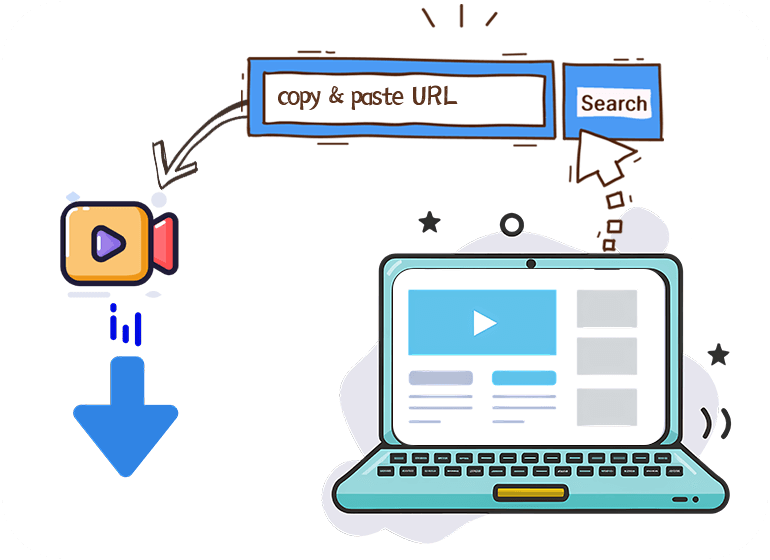
The Medal Clip Downloader makes saving gaming clips incredibly simple. By copying the clip's URL from Medal.tv and pasting it into the input box, the tool instantly detects the link and prepares the video for download. There's no need for sign-ups, extensions, or additional software, making it a fast, seamless process. Whether saving a short clip or a longer highlight reel, the tool works efficiently every time, ensuring a smooth download experience with no freezes, broken links, or errors. This feature is especially helpful for gamers who want immediate access to their clips. It eliminates all unnecessary steps, focusing solely on getting the video into your device. With one click, users can quickly download their favorite clips without being interrupted by any extra processes or sign-in requirements. The simplicity of this feature makes it an attractive choice for anyone looking for a hassle-free way to save their Medal.TV moments.

When using the Medal Clip Downloader, all clips are downloaded in the same high-quality resolution as they were uploaded. The original video quality is preserved if the clip is in 480p, 720p, or full 1080p HD. This means the colors stay vibrant, the motion remains smooth, and the audio is perfectly in sync, just like the original. It's an ideal feature for gamers who want to share or save their clips in the best possible format. Moreover, the tool ensures that even longer clips maintain clarity and sharpness throughout the download. No forced compression is applied so that users can keep every second of gameplay in its finest quality. This is particularly valuable for those who want to archive their most epic in-game moments without sacrificing visual or audio integrity, ensuring a premium online and offline experience.
The Medal Clip Downloader provides an entirely ad-free experience, allowing users to focus solely on their task without interruptions from pop-ups or misleading buttons. The website's minimalistic design enhances the overall user experience, ensuring easy navigation for anyone, regardless of technical knowledge. It offers a straightforward, clean interface, making it easy to find exactly what you need without distractions. This feature eliminates the frustration often caused by cluttered and ad-heavy sites, ensuring a smooth and enjoyable downloading process. The absence of ads also contributes to faster load times and smoother operation. Whether you're using a desktop or mobile device, the simple layout makes navigating and getting started easy. The process is efficient and user-friendly, allowing gamers to grab their favorite clips quickly without confusion or delay. This ad-free design ensures a seamless and uninterrupted experience from start to finish.

When you download clips from Medal.tv, you won't have to worry about losing any video quality. The Medal Clip Downloader preserves the original resolution of your clips, from HD to 4K, ensuring every detail remains intact. Whether downloading a quick highlight or a lengthy gaming session, the download will be crisp and clear, just like the original video. There's no need to settle for low-quality, compressed versions.
The Medal Clip Downloader ensures all your downloads are secure and malware-free. The tool is designed with safety in mind, ensuring no malicious software or unwanted pop-ups interrupt your experience. You can confidently download clips, knowing your device is protected from harmful files. It's a reliable and secure way to grab your favorite Medal.tv clips without worrying about viruses or unwanted interference.
The Medal Clip Downloader is fully compatible with all devices, including smartphones, tablets, and desktops. Whether yoing an iPhone, Android, Windows, or Mac, the tool works seamlessly across platforms. It doesn't require special software or apps to be installed on your device, making it a versatile option for users on the go. You can download clips from Medal.tv and enjoy them anywhere, anytime, regardless of your device.




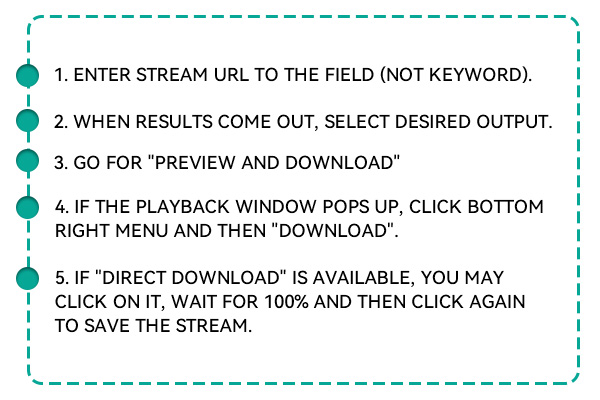
To download clips from Medal.tv, visit the Medal Clip Downloader page. Copy the URL of the Medal.tv clip you want to save. Then, paste the copied link into the input box on the downloader page. After selecting the video format and quality, hit the download button, and the clip will be saved directly to your device in no time.
Yes, using a Medal.tv video downloader is completely safe when you choose a reliable tool. Our Medal Clip Downloader is designed with security in mind, ensuring your data remains private. There are no risks of malware or unwanted software. It operates without intrusive pop-ups, keeping your experience safe and secure from start to finish.
Absolutely! Our Medal Clip Downloader allows you to download high-quality clips in high-definition (HD). Whether the original clip is available in 720p or 1080p, you can select the preferred resolution during the download process. This ensures the video remains crisp, clear, and high-quality, just as you saw it on Medal.tv.
No, you don't need an account to use the Medal Clip Downloader. The tool is entirely free and does not require you to sign up or log in. Paste the link to the Medal.Clip the TV, select your download preferences, and you're good to go. The downloader is designed to be quick and accessible without any registration barriers.
Our Medal Clip Downloader supports MP4 as the main video format, ensuring compatibility with various devices, including smartphones, tablets, and computers. MP4 is a universally accepted format that guarantees smooth playback without requiring additional software or players. You can also choose from different video qualities to suit your needs.
















$19.95$9.95$49.95$19.95$69.95$39.95