 Aquapp Studio



 Facebook is one of the famous social media platforms where people connect, share, and discover content every day. It’s widely known for its engaging features, which let you post updates, share photos, and, most importantly, watch countless videos. Moreover, Facebook is filled with entertaining content such as music clips, tutorials, live streams, and interviews that people love to enjoy. However, despite having so many great videos, Facebook doesn’t provide a direct option to download or extract the audio from them. This is inconvenient, especially for users who want to save background music, voice clips, or sound effects from their favorite videos. Because of this, many people look for other ways to get the audio they want from Facebook videos. In this article, we will show you simple and safe methods to extract audio from Facebook video, so you can enjoy your favorite sounds anytime and anywhere.
How to Get Facebook Video URL to Extract Audio
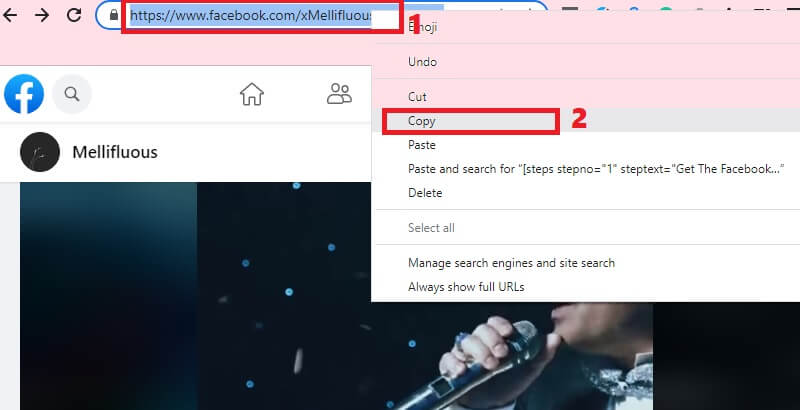
Before you can extract sound from Facebook video, you will need to know first how to get the URL of the Facebook video. But don’t worry, it’s nothing but a simple task. All you have to do is to follow these two steps:
1. Look for the Facebook video, in which you want to extract the audio, and then play it.
2. While playing, copy its URL directly from the browser address bar, and that's it.
Once you have copied the Facebook video link, you can now head on to the next part below, which talks about the tools you can use.
Best Way to Download and Convert Facebook Video to MP3
Distinctive Feature: It can act as a search engine where you can download music from the internet quickly without copying links.
Supported Sites: Aside from Facebook, this tool also supports other video-streaming platforms like YouTube, Instagram, Twitter, Vimeo, Bandcamp, and more.
Facebook caters different music files that users can stream freely. However, this social media platform does not provide its users an ability to download music for offline use. Hence, it is needed to use a reliable tool to do the job. AceThinker Free Online Facebook to MP3 Downloader is one of the greatest music rippers we have on the internet. This tool can directly save Facebook audio files into an MP3 container. Also, with its advanced algorithms, this online utility can extract music easily and quickly without the need of a signup account and premium services. More so, it gives crisp and high standard audio files that can reach up to 320kbps.
Step 1. Get The Facebook Video URL
On your browser, visit Facebook's official site. Make sure to log in to your Facebook account to access the site. Once logged in, look for the video that you wish to extract out the audio. After that, copy the link like what we have mentioned in part one.
Step 2. Paste Link to The Facebook Audio Extractor
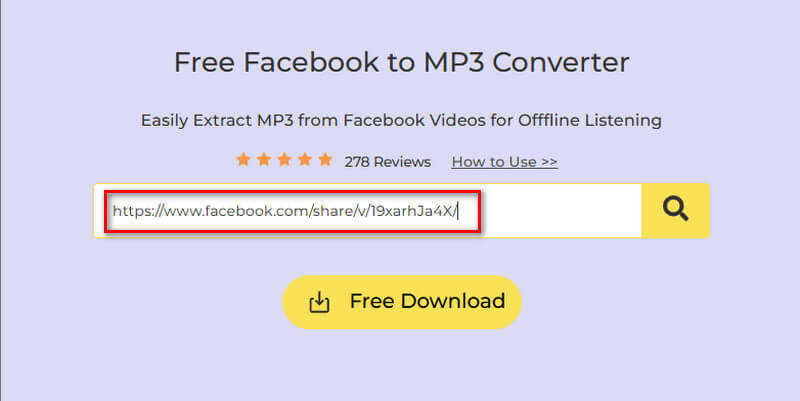
Next, open a new tab and click on the embedded link to access the online tool. From the tool’s interface, paste the link into the input bar. Hit the download icon beside it, and the tool will start analyzing the link.
Step 3. Download the Extracted Audio
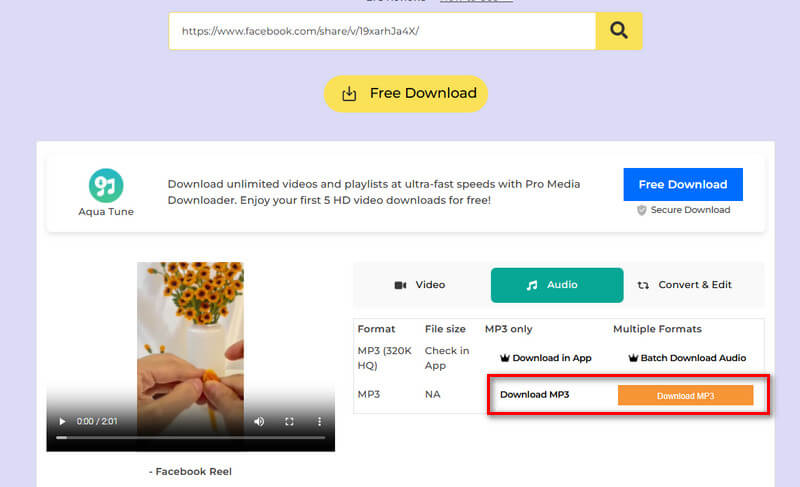
The moment the link has been analyzed, click “Download” to see the available output format and quality. Select the highest possible quality format under the Audio section by clicking the “Download” button right beside it. Once clicked, the tool will start downloading the audio extracted from the Facebook video.
Other Reliable Methods to Extract Audio from FB Video
If you're looking for other tools to extract audio from Facebook videos, several online tools can help you achieve this without installing any software. These tools permit you to convert Facebook videos into MP3 files quickly and easily, making them ideal for saving background music, podcasts, or any audio content from Facebook. Below are three other reliable solutions that offer convenient features for downloading Facebook video audio.
1. FBDownloader
Distinctive Feature: It supports a QR code that the user can scan to save the Facebook video on their device.
Supported Sites: Designed for downloading Facebook video only.
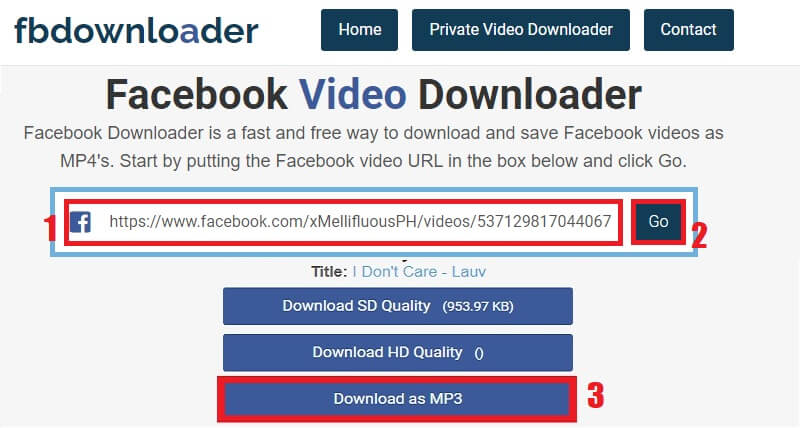
FBDownloader is a simple video downloader that you can use to extract MP3 from Facebook videos. It doesn't want to be anything else. Thus, this tool makes sure that it satisfies users who only want to download videos from the social media platform. This application is ideal if you want to download Facebook video without software. Using this tool, you can save a video in MP4 format or even convert a video to MP3 for audio needs. Besides, the download process is also fairly straightforward. Like the first online tool mentioned above, FBDownloader is also completely free.
User Guide:
- Go to your Facebook account and copy the URL of the Facebook video. Then navigate back to the online tool to paste the link.
- Once pasted, hit the "Go" button. The tool will begin to analyze the link for a moment.
- After the link has been analyzed, the tool will make the file ready to download. Here, select "Download as MP3."
2. Getfvid
Distinctive Feature: The tool is available as a browser extension which users can use to download Facebook videos without copying the URL.
Supported Sites: Supported Facebook platform only.
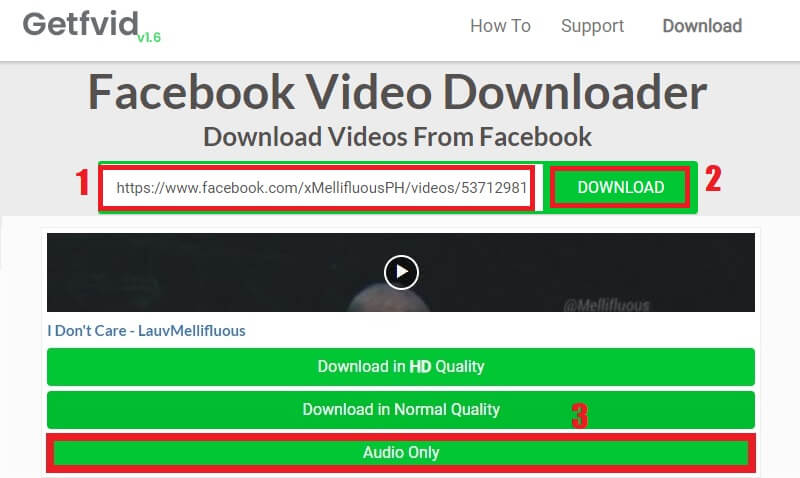
GetfVid is a well-known web-based tool for downloading and converting Facebook videos. This tool works on computers, mobile devices, and tablets. With this tool, you can easily extract sound from Facebook videos. It offers a hassle-free download. Aside from the merits mentioned above, the tool also has a simple interface that is appealing to the eye. This web-based online tool also allows you to download GIFs and Facebook live videos. Moreover, the developer continuously updates the online tool to include new features to improve its overall efficiency and satisfy user experience downloading Facebook videos.
User Guide:
- First, grab the URL of the Facebook video which you want to take out the audio.
- Next, go to the Gefvid official site and paste the Facebook URL from the input box.
- After that, hit the green “Download” button and select “Audio Only” from the download option.
3. Video-Converter-MP4
Distinctive Feature: The tool can download audio quality such as 187k, 168k, 126k, or 110k, depending on the source of the Facebook video.
Supported Sites: Facebook, Vimeo, YouTube, Instagram, Soundcloud, and other popular sites.
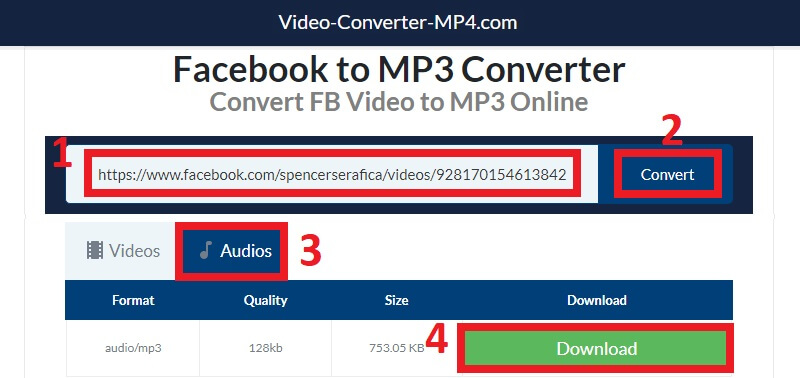
Video-Converter-MP4 is an online Facebook video converter that provides the simplest yet secure way to grab videos from the Facebook platform. Using this tool will not only enable you to convert Facebook video into MP4 format. But, this tool will also allow you to extract audio from Facebook videos and download them to your device. Aside from that, this online tool is completely free to use and does not require any further registration. This is to guarantee that you can convert the videos quickly and efficiently. In addition, there is no limit to how many videos you can convert with a single IP address.
User Guide:
- From your FB account, go to the Facebook watch section. Then, copy the link to the video you want to download as MP3.
- Next, go to the Video-Converter-MP4 online tool and paste the copied link into the URL box. Once done, hit the “Convert” button beside it.
- When the link has been thoroughly analyzed, go to the “Audios" tab, select the preferred quality, and hit the green “Download” button.
Extra Tips: Things to Remember Before Extracting Audio from Facebook
Before you start extracting audio from Facebook videos, it’s important to keep a few key points in mind. These reminders will help you stay safe, avoid legal problems, and achieve the best possible audio quality. See them below.
1. Check for Copyright Restrictions
Not all Facebook videos are free to download. Some may be protected by copyright, meaning you cannot legally extract or reuse their audio without permission. Therefore, always make sure the video is your own or has a license that allows downloading or sharing.
2. Use Trusted and Safe Tools
Since many online downloaders exist, not all of them are secure. Some may contain ads, malware, or fake download buttons. With that in mind, it’s best to choose well-known tools with positive user reviews and clear privacy policies.
3. Avoid Extracting Audio from Private Videos
Private or restricted videos are meant only for specific audiences. Downloading audio from them without consent can violate someone’s privacy. Hence, focus only on public or freely available Facebook videos.
4. Check Audio Format and Quality
Audio downloaders offer multiple audio formats, such as MP3, M4A, and WAV. To ensure smooth playback, select the format compatible with your device.
5. Respect Facebook’s Terms of Service
Lastly, always follow Facebook’s rules regarding content usage and downloads. Extracting audio for personal use is generally fine, but distributing it publicly without permission may lead to issues.
Conclusion
Extracting audio from Facebook videos can be quite simple, especially with the right tools. Whether you're saving background music or personal audio content, online solutions make the process quick and hassle-free. Moreover, these tools allow you to convert Facebook videos into high-quality MP3 files without requiring any complex software. With just a video URL, you can effortlessly enjoy your favorite sounds offline anytime. Therefore, choose the method that best suits your needs and start enjoying audio from Facebook videos effortlessly.


