 Aquapp Studio



 Zee5 is a popular streaming platform offering a wide range of entertainment, including movies, shows, web series, and live channels. It provides content in multiple languages, making it one of the most diverse streaming services available today. Moreover, Zee5 lets users enjoy both local and international programs anytime and anywhere. However, while the app offers a download option, this feature is only available to premium users. Because of this, some of its users look for other ways to download Zee5 videos for offline viewing. There are various tools and video downloaders that can help users save their favorite shows without paying for a subscription. In this article, we will guide you through different methods to download Zee5 video easily and safely. By the end, you’ll know the best ways to keep your favorite Zee5 content and watch it even without an internet connection.
Know More About Zee5 Streaming Platform
Zee5 is a popular Indian streaming platform that offers a massive collection of entertainment content, including TV shows, movies, web series, and live TV. Zee Entertainment Enterprises launched it and has quickly become one of the most visited OTT platforms in India and abroad. Moreover, Zee5 supports multiple languages, enabling users to enjoy regional and international content easily.
Features of Zee5
- Vast Content Library: Zee5 provides thousands of movies, shows, and original web series in different genres. In addition, users can explore both classic and newly released titles, making it suitable for all types of viewers.
- Multi-Language Support: The platform supports more than 12 Indian languages, including Hindi, Tamil, Telugu, and Bengali. Furthermore, this feature allows viewers to watch content in their preferred language, providing a more personalized experience.
- Zee5 Originals: In addition to popular TV shows, Zee5 also produces original series and films. These exclusive titles attract many users seeking fresh, unique content not available elsewhere.
- Live TV Channels: Zee5 lets users stream live TV channels across news, sports, and entertainment. As a result, it serves as both a streaming and live television platform for viewers who prefer real-time programs.
- Offline Download Option: Users with a premium subscription can download videos to watch offline later. However, the download option is available only in its mobile app, not on the website.
- User-Friendly Interface: The site has an easy-to-navigate interface, making it simple for first-time users as well. In addition, it neatly categorizes content by genre, language, and type, so users can find what they want quickly.
- High-Quality Streaming: Zee5 supports HD and Full HD video playback, offering a smooth viewing experience. Moreover, users can adjust video quality depending on their internet speed or data usage preference.
How to Download Zee5 Video on PC/Mac
Distinctive Feature: It can remove ads from video sources automatically.
Limitation: The free Trial version allows you to download only 3 videos daily.
Zee5 is one of the websites that you can visit to watch movies online. It is available on Android and iPhone devices, enabling you to download videos, But if you are using a PC or Mac. It would be best if you found a Zee5 video downloader. For that, we have introduced CleverGet. This tool has massive support from 1000+ websites like Netflix, Youtube, Twitch, HBO, and more. It offers an impressive spectrum of video quality, ranging from standard definition at 720p all the way up to stunning 8K resolution, catering to diverse preferences and viewing experiences. Moreover, allow users to download live-stream videos and even paid movies with its in-built browser. Furthermore, it has a batch downloading feature to download a playlist or the whole episode of the series. Below is a detailed guide to downloading a video.
Try it for Free
Step 1. Install the Zee5 Video Downloader
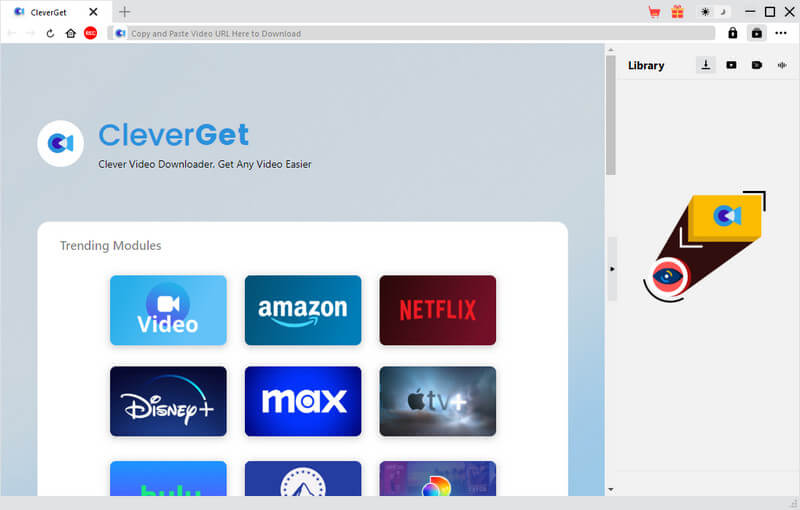
Before we download the video from Zee5 on PC/Mac, you must first download the CleverGet. Click its name to go directly to its official website. Or you can click the download button below and select an installer. Next, come after the setup window and launch the software.
Step 2. Paste the Zee5 link on CleverGet
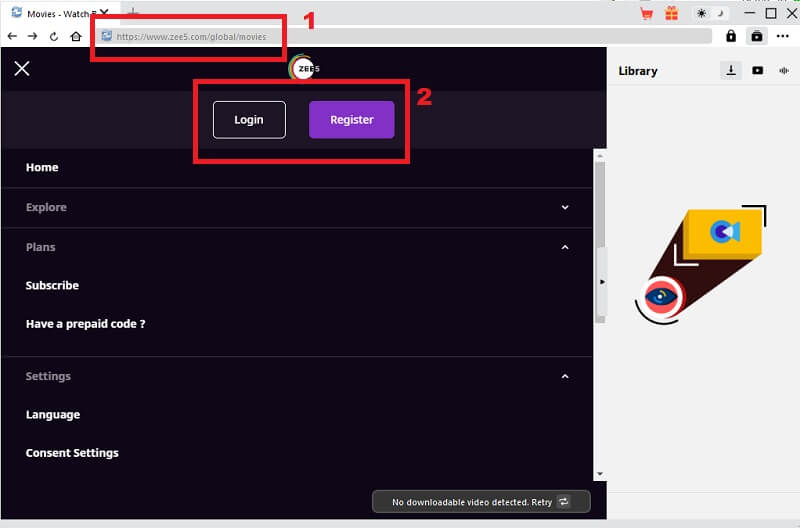
Next, go to the browser and search for Zee5. Make sure that you copy the URL of the official website. Then, paste it into the browser of CleverGet. After that, log in/register first before using it.
Step 3. Find a Movie
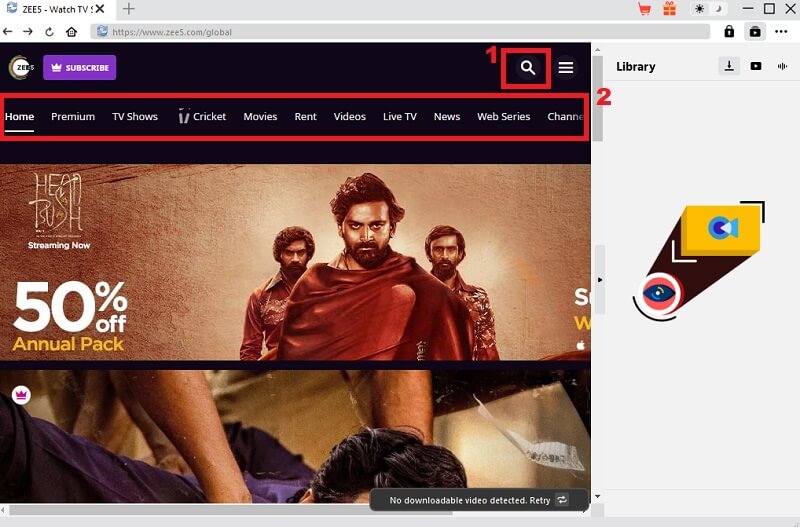
Once you're done registering, move to Zee5 website and locate a movie you wish to get. Tap the search icon and type the title of the movie. But if you're still looking for a movie to watch offline. Scroll down to find a movie. Or you can click each tab you can see at the upper section of the web page.
Step 4. Start to Download Zee5 Videos Online
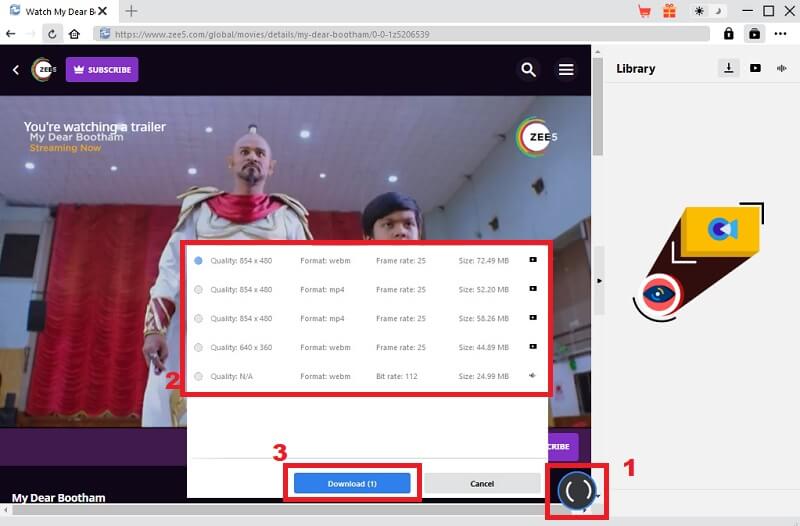
Suppose you're done looking for a movie. Tap the "Download" icon and choose what quality, format, frame rate, and file size you want. Afterward, hit the "Download" button to download content. Please wait until it finishes, and you now watch the movie offline and see the video details.
How to Download Video from Zee5 on Mobile
1. On Android
Suppose you are using an Android phone and want to download a Zee5 movie. Here, you don't need a Zee5 online downloader for Android because you can download it directly on the app. When you download movies in this app, you can experience 3x faster downloading speed. Please follow the guide below, but make sure that you have enough SD card and internal memory for your Android phone.
User Guide:
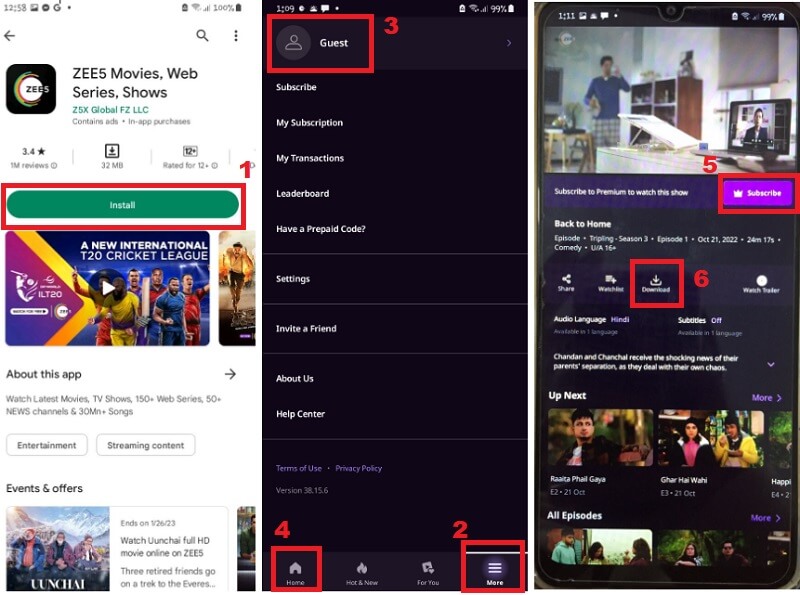
- Get the Zee5 app on Play Store and install it. Then, open and explore the app first. To log in/register, tap the "More" tab and hit "Guest." And put all the information they need.
- Next, go back to "Home" and start looking for a Zee5 episode download and watch it offline. Suppose you have the series title; you can search for it on the search bar. Or you can visit all the tabs on the top of its interface to find a movie series.
- Lastly, once you are done finding a movie or Live TV, tap on it. Then, you can see the Share, Watchlist, Download, and Watch Trailer under it. Hit the "Download" button to start the downloading process. But you need to buy a subscription plan first to allow you to download videos like movies, Live TV, series and more.
2. On iPhone
Suppose you don't want to download a Zee5 video downloader for PC and prefer to use your iPhone. Here, you don't need to download a downloader because you can directly get it in the Zee5 app. Follow the tutorial below.
User Guide:
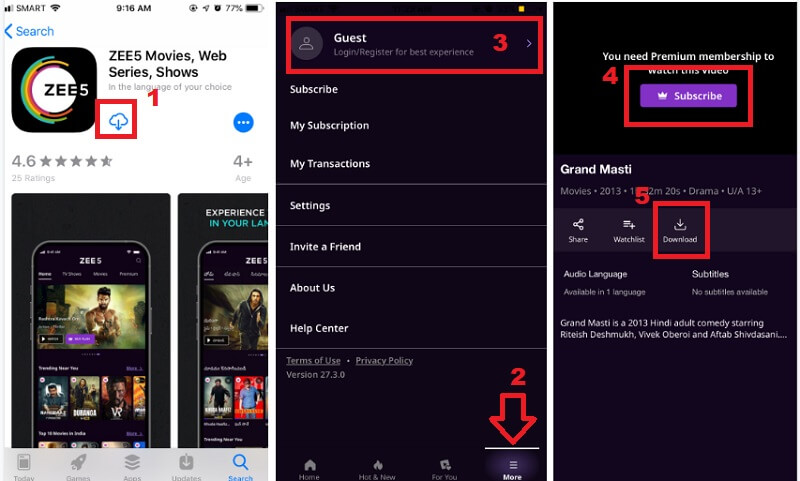
- First, get the Zee5 app in the App Store. Install and Launch it. Click "Allow" for the permission notification on your screen. Afterward, you must log in or register first before using it. Tap the "More" tab located at the bottom left corner of the app and hit "Guest." Please enter all the information they need.
- Afterward, hit the "Home" tab and look for a movie. On the app's top, you can see different tabs like Premium, Movies, Shows, and more. You can tap them one by one until you find a movie you want to watch offline.
- Once you're done finding it, click the movie and see the download button under it to start downloading. But since most or all of the movies on Zee5 are in the Premium version. It would be best if you avail of the subscription before watching and downloading the movie.
Frequently Asked Questions
Can I download DRM-protected videos from Zee5?
No, you can't do that. Zee5 disables even screen recording to prevent content from being stolen. All such content is generally DRM-protected and delivered in multiple streams rather than as a single MP4 file.

Where can I find the downloaded movies?
You can see your downloaded videos in the "My Downloads" folder. Suppose you are using Android and iPhone; drop the "More" button at the app's top-right corner. Under that, you can see "My Downloads." On PC/Mac, click the 3 horizontal lines on the top-right corner of the tool. Under that, select “My Downloads” under the “My Account” section.
What is the disadvantage of Zee5?
The disadvantage of this app is most of the movies are on a subscription plan, and you can only watch the trailer of your favorite movies and can't even download it. It would be best to buy a subscription plan before you can enjoy using the Zee5 app.
Can I download Zee5 video from major social media channels?
No, you cannot directly download Zee5 videos from major social media channels. Zee5 content is typically exclusive to its platform and may not be available for download on social media channels due to copyright and licensing restrictions.
Conclusion
Zee5, a leading video streaming platform in India, acknowledges users' preferences for offline viewing due to slow internet or other reasons. To cater to this demand, Zee5 offers a convenient feature enabling users to download movies (video depends on their preferences) and TV shows for offline enjoyment. This article provides a comprehensive guide on downloading Zee5 videos on PC/Mac, Android, and iPhone, ensuring accessibility regardless of the user's device or location.


