 Aquapp Studio



 Embedded videos are videos that are placed inside a webpage from platforms like YouTube, Vimeo, Facebook, or other streaming sites. They allow users to watch videos directly on the website without visiting another page. For example, you might see embedded videos on blogs, news articles, or online tutorials while browsing the internet. However, many people want to save these videos for offline viewing, school projects, or presentations. Because of this, downloading embedded videos has become a common need for users who wish to access content anytime. The challenge, though, is that most embedded videos lack a download option, making it difficult to save them directly. Therefore, in this article, we will show you simple, effective ways to download embedded video from various websites quickly and hassle-free.
Save Embedded Video Directly from the Site
Although most video sharing websites have no download option beside each video, sometimes you can still save them using a trick. But remember, this tip that we will impart is not working for all videos. Also, you're not allowed to choose the download quality and also the video format. Despite that, this is still a good alternative since you don't have to use any third-party tool to download embedded videos from websites. In addition, this process can also download YouTube video with subtitles, which is convenient if you need subtitles for the video.
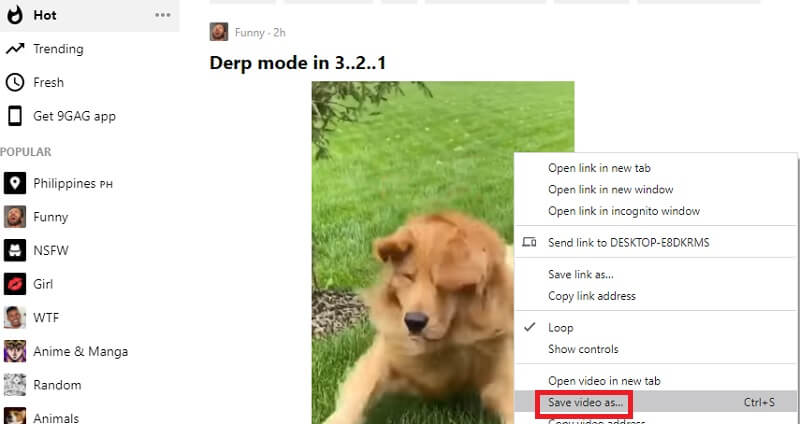
Ways to save embedded video:
- First, open your browser and access the website of the video you need to download.
- Play the video file first, right-click on it, and choose "Save Video as.." from the menu that will appear.
- Wait for a few moments and once it's done. Open your download folder and play the saved embedded video by the embedded video downloader.
Download Embedded Video from Any Website with Professional App
What if the first tip is not working on the video you want? Luckily, Aqua Clip is here for you! This computer software is a top-rated video downloading program that can download all trending videos and music from different sites. These following sites include Facebook, Vimeo, Dailymotion, Instagram, Twitter, and more. In addition, this tool can download videos embedded in high-quality, including 720P, 1080P, and 4K video resolution. Furthermore, this tool can download video embedded online files in different video formats. These file containers are MP4, WMV, AVI, MOV, and more. In addition, it is a reliable Flash video downloader.
Try it for Free
Step 1. Install the Aqua Clip
To instigate the process, download Aqua Clip on your device by clicking the "Download" button. Launch the video file and follow the walkthrough on installing the tool on your PC. Once installed, open the file and make your way to the Settings. Modify different preferences, including video quality, format, and more.
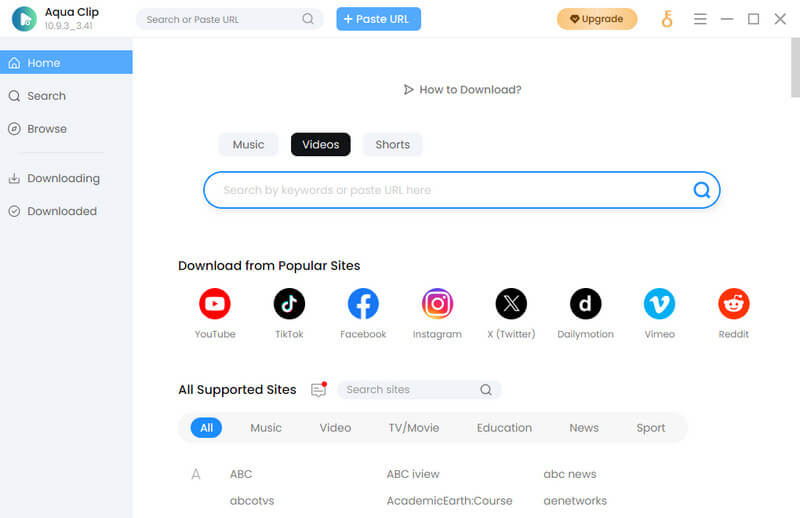
Step 2. Download Embedded Videos from Any Sites
The subsequent step is to get the URL from a different site where you want to download embedded videos directly. Since this program can save the embedded video, copy the URL of the video, and go back to Aqua Clip. Wait until the tool analyzes the video.
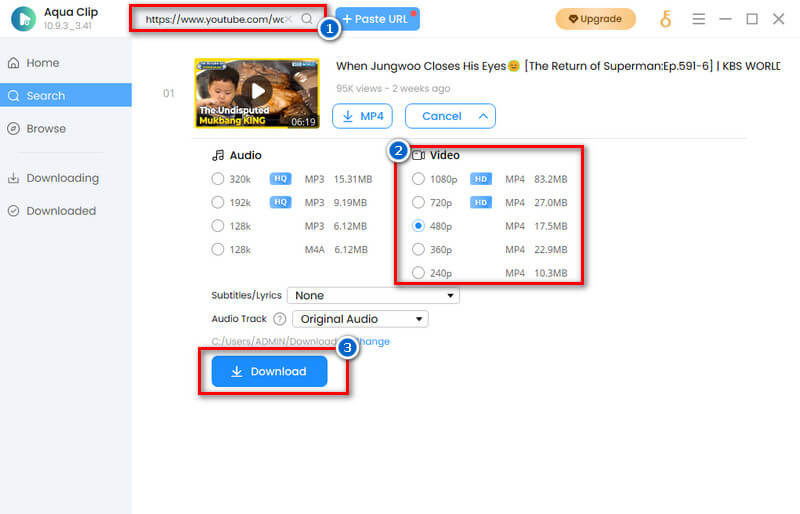
Step 3. Preview the Downloaded Video
Last, hit the Download icon to save video on your file directly. Wait until the process finishes. Then, go to the Completed tab to play and preview the downloaded. You can download embedded videos again if you like. That's how you download embedded videos easily.
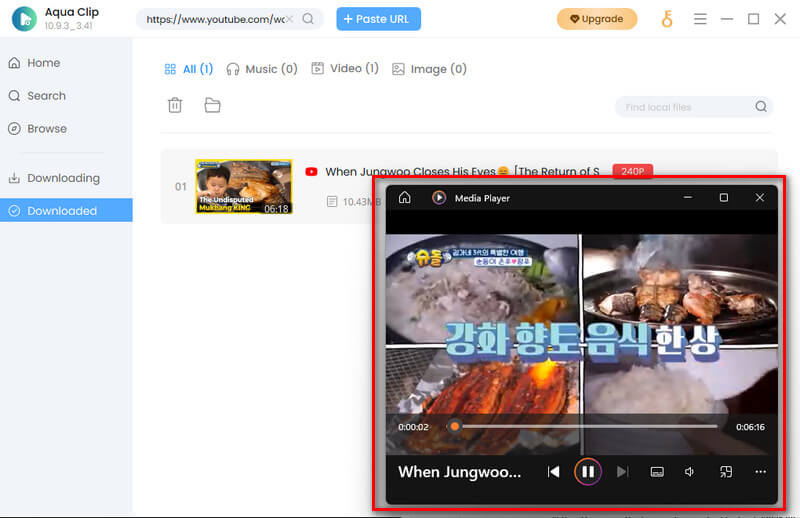
Download Embedded Videos Online for Free
Another AceThinker free video downloader tool that you can use to save embedded videos online is the website video downloader service. You only need a web browser and an internet connection to download videos of your desire. In fact, this online tool supports multiple web browsers like Mozilla Firefox, Google Chrome, Internet Explorer, and Safari. Besides, it can be used on both Windows PC and Mac. With a simple copy and paste method of the video from a website, you can easily download the embedded video. For more understanding about this tool, you can follow the three ways below on how to download the video.
Step 1. Visit AceThinker Free Online Video Downloader
The first thing you need to do is copy the video link from any sites. You can click on the video first to check it. Then, visit the official website of AceThinker Free Online Video Downloader and paste the link on its URL bar. After that, click the "Search" icon beside the URL to start analyzing the video.

Step 2. Choose Video Format
Next, wait for the tool to finish analyzing the video. Once done, it will show you a new option showing all the available video formats and resolutions. Choose the quality download you preferred then click the "Download" icon to keep embedded videos online.
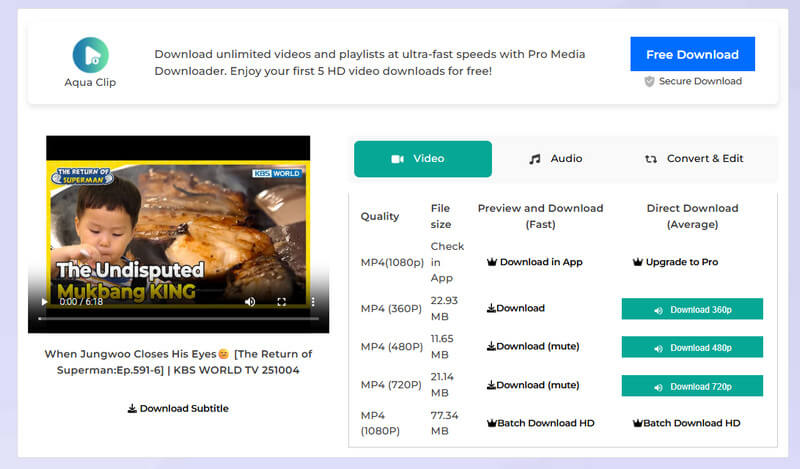
Step 3. Download and Play the Video
Once you select the "Download" icon, you will be redirected to a new window. On the bottom right corner of the video, click the vertical ellipsis to see the download an embedded video option. Lastly, click the "Download" icon to save embedded videos. After that, you can locate the video on the left corner of your opened window, right click it, choose "Open," and hit the play button to check your video.

Capture Embedded Video with Browser Extension
The last tool that we are going to show you from our list is Video DownloadHelper. It is an extension that you can use to download videos in Chrome and Firefox. In fact, Video Downloadhelper is known as the complete tool to download embedded video from website. Besides, you can convert the video that you are downloading and even the downloaded videos to MP4 or WEBM. Also, you can use it to capture YouTube videos and other videos from popular video streaming sites, like Vimeo, Dailymotion, and more. Moreover, below is a detailed guide on how to capture embedded videos and multiple videos.
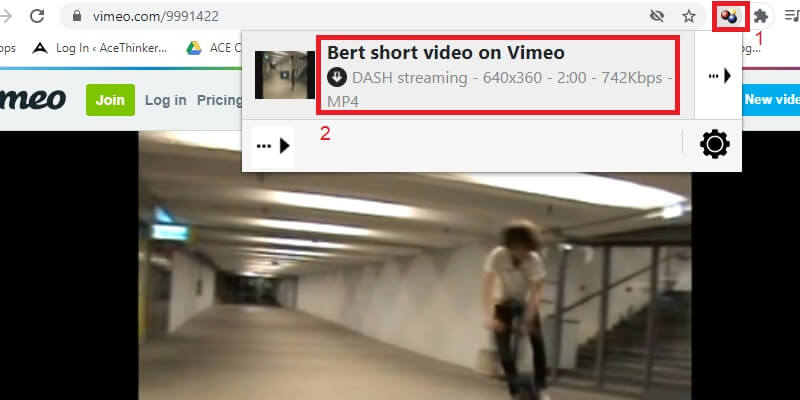
Ways to download embedded video:
- You can begin using this tool to save embedded videos from websites by searching it on Chrome Web Store to install it on your web browser.
- Then, play the video that you want to download from any video streaming site. After that, click the Video DownloadHelper icon beside the URL bar of your web browser.
- Select the video format you like and download videos on your computer to play it while offline. Then check the downloaded files. That's how you use Video DownloadHelper to download video.
Frequently Asked Questions
What is an embedded video?
An embedded video is displayed directly on a webpage but hosted on another platform, such as YouTube, Vimeo, or Facebook. It allows visitors to watch the video without leaving the website. In most cases, websites use embedded videos to make their pages more interactive and engaging.

How do I embed a video?
To embed a video, you first need to upload it to a hosting site such as YouTube or Vimeo. Then, copy the provided “embed code” from the streaming platform and paste it into your website’s HTML. As a result, visitors can watch the video directly on your webpage without opening a new tab.
Can you download an embedded video?
Yes, you can download embedded videos, but not all websites allow it. Some embedded videos don’t have a visible download button. Therefore, you can use online downloaders, browser extensions, or special software to save them safely.
Conclusion
The ability to download embedded videos is a valuable skill that empowers you to enjoy multimedia content on your terms. Whether for educational purposes, entertainment, or offline viewing convenience, the methods discussed in this post offer various solutions to meet your needs on most videos. By following the recommended steps and techniques, you can navigate the intricacies of multiple platforms and browsers. This ensures that download videos are within your reach whenever you desire. With these tools, online multimedia is at your fingertips, ready to be explored, saved, and enjoyed at your convenience. Happy downloading!


